Set Up IPTV – How to Install IPTV on Fire TV Stick, IBO Player, Smart TV & More

Setting up IPTV takes about five minutes. Below you find a step-by-step IPTV installation guide for every device: Amazon Fire TV Stick, IBO Player, Samsung and LG Smart TV, Android, Apple iPhone and iPad, MAG box, Windows and Mac. All guides work with the login details (Xtream Codes or M3U playlist) that we send you after you buy IPTV. If you can’t find your device, don’t be concerned: we support all devices and all apps and will help you personally via WhatsApp, e-mail or live chat. Prefer to try first? Request a free IPTV test.

Select Your Device – IPTV Installation Guides

Step 1: You can download SetIPTV/NetIPTV/Smart IPTV from your TV store on Samsung, LG…

Step 2: After installation, open the app and you will find the MAC address on the screen.

EX:

IPTV on Smart TV – MAC address screen of the Smart IPTV app

Step 3: Send us MAC address via Whatsapp/Email/Live Chat

Step 4: After a minute, reset your TV and open the app

How to set up IPTV on IBO Player (Smart TV, Android TV, Fire TV)

Step 1: Install IBO Player (or IBO Player Pro) from the app store of your Samsung, LG or Android TV, or from the Amazon Appstore on your Fire TV Stick.

Step 2: Open the app. On the start screen you will see your MAC address and your Device Key.

Step 3: Send us the MAC address and the Device Key via WhatsApp, e-mail or live chat.

Step 4: We upload your IPTV playlist (M3U or Xtream Codes) to your IBO Player from our side. You do not need to type anything.

Step 5: Restart IBO Player. Your channels, movies and series appear automatically. If the playlist does not load, close the app and open it again after one minute.

How to install IPTV Smarters Pro on Fire TV Stick (step by step)

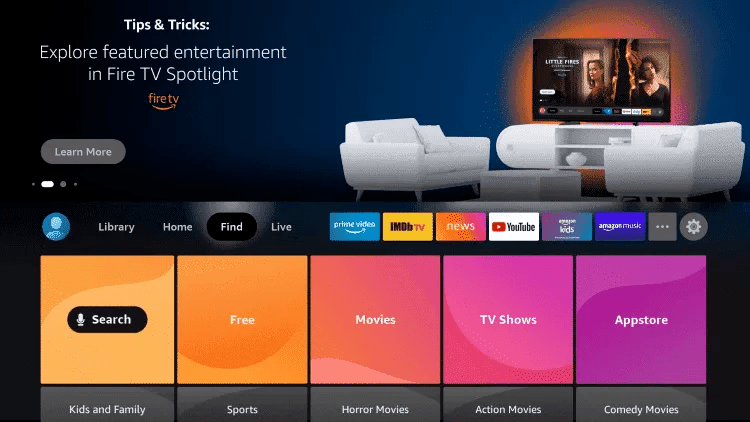
1: From the home screen of your device, hover over the Search option.
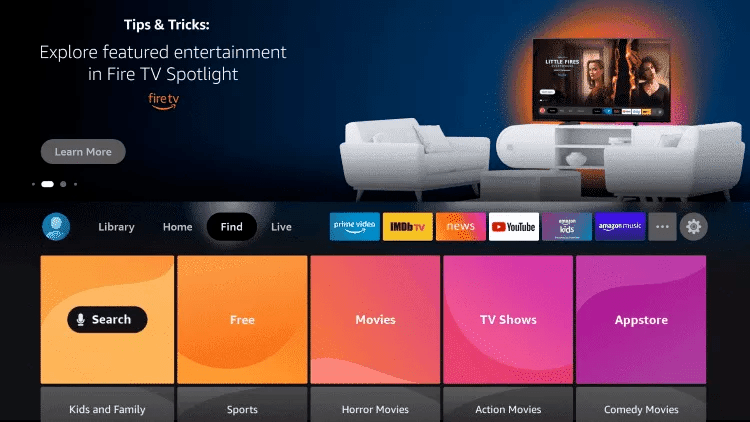
Install IPTV Smarters Pro on Fire TV Stick – step 1

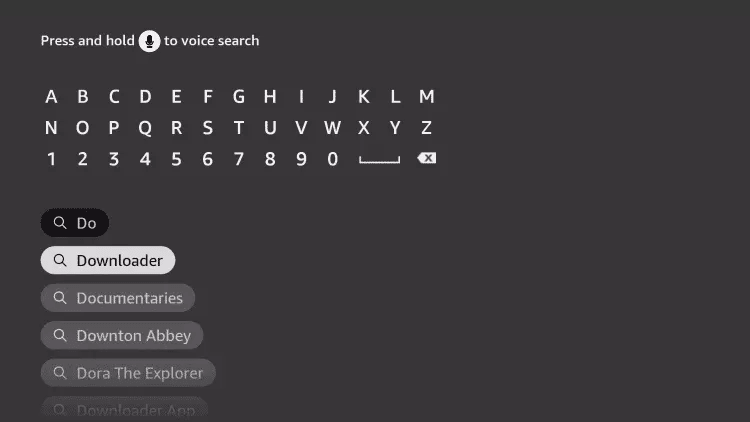
2. Click Search.

Install IPTV Smarters Pro on Fire TV Stick – step 2

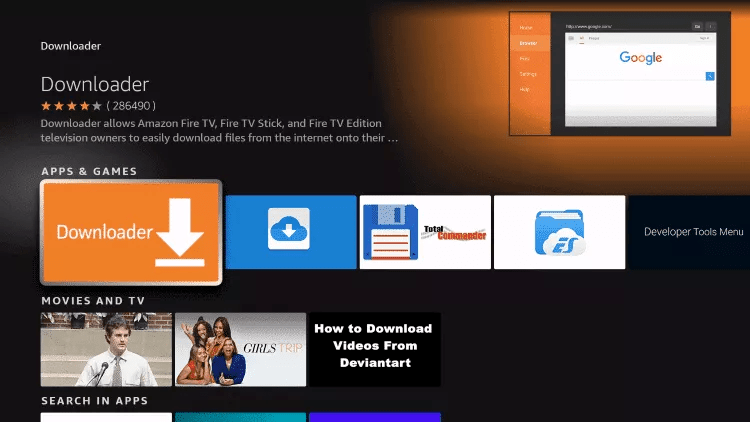
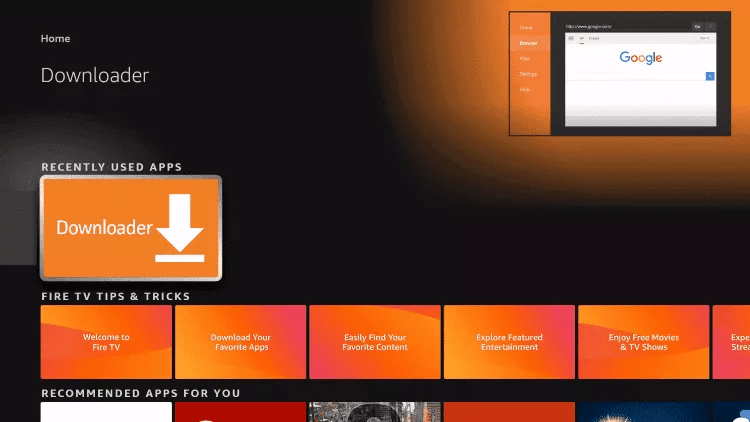
3. Find and select Downloader.

Install IPTV Smarters Pro on Fire TV Stick – step 3

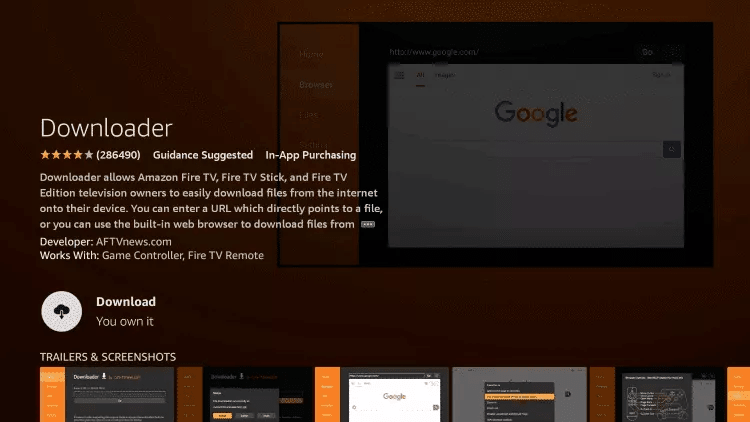
4. Choose the Downloader app.

Install IPTV Smarters Pro on Fire TV Stick – step 4

5. Click Download.

Install IPTV Smarters Pro on Fire TV Stick – step 5

6. Once the app has finished installing, click Open.
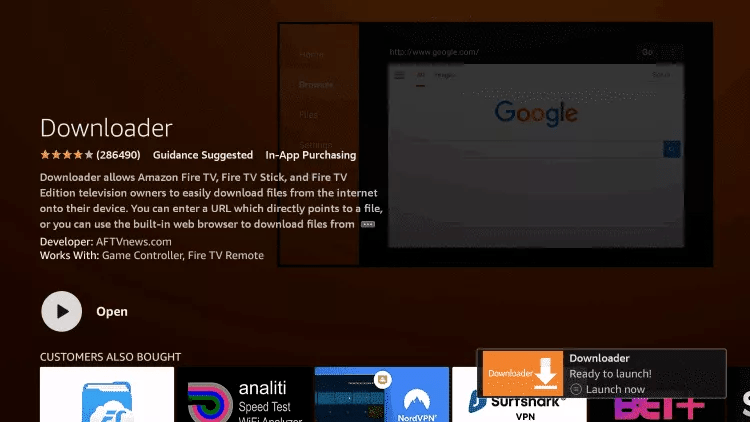
Install IPTV Smarters Pro on Fire TV Stick – step 6

7. Go back to the home screen and open Settings.
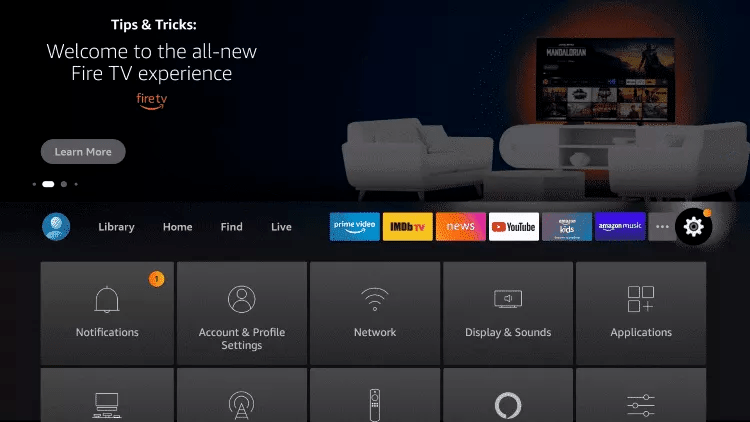
Install IPTV Smarters Pro on Fire TV Stick – step 7

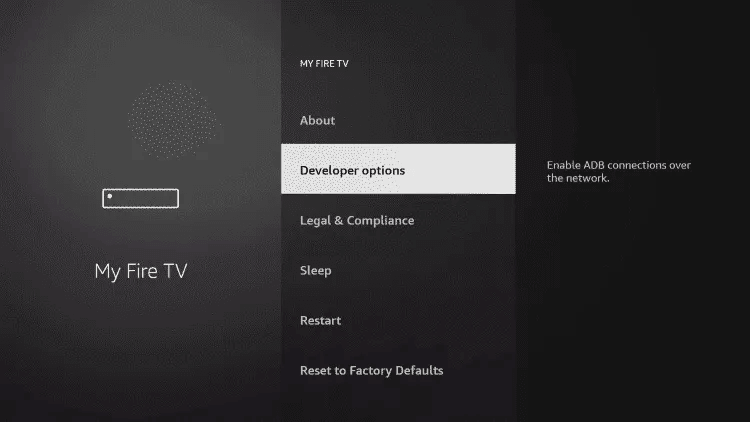
8. Click My Fire TV.

Install IPTV Smarters Pro on Fire TV Stick – step 8

9. Choose Developer Options.

Install IPTV Smarters Pro on Fire TV Stick – step 9

10. Click Install unknown apps.

Install IPTV Smarters Pro on Fire TV Stick – step 10

11. Find the Downloader app and click on it.

Install IPTV Smarters Pro on Fire TV Stick – step 11

12. This will enable unknown sources for the Downloader application. This will allow the download on your device.
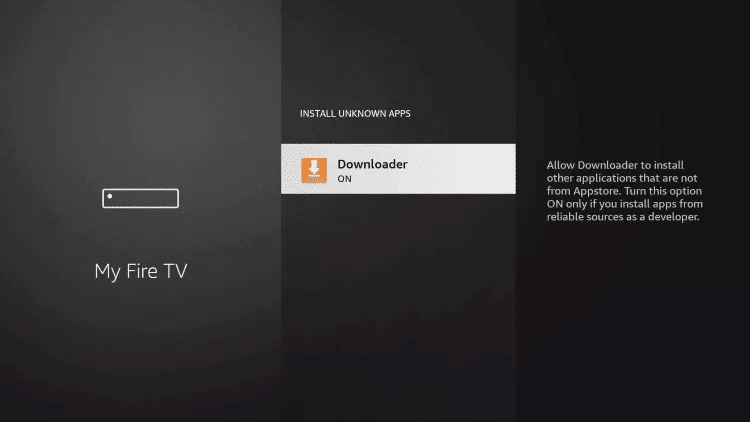
Install IPTV Smarters Pro on Fire TV Stick – step 12

13. Launch the downloader.

Install IPTV Smarters Pro on Fire TV Stick – step 13

14. Click Allow.

Install IPTV Smarters Pro on Fire TV Stick – step 14

15. Click OK.

Install IPTV Smarters Pro on Fire TV Stick – step 15

16. Type the following URL exactly as shown here: https://www.iptvsmarters.com/smarters.apk

and click Go.

Install IPTV Smarters Pro on Fire TV Stick – step 16

17. Wait for the file to download.

Install IPTV Smarters Pro on Fire TV Stick – step 17

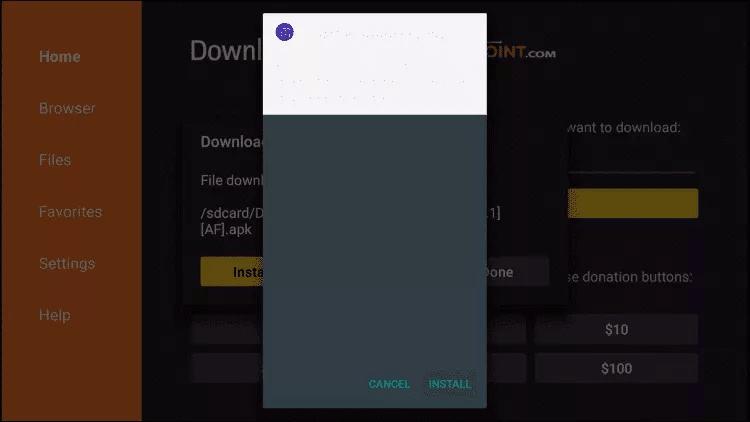
18. Click Install.

Install IPTV Smarters Pro on Fire TV Stick – step 18

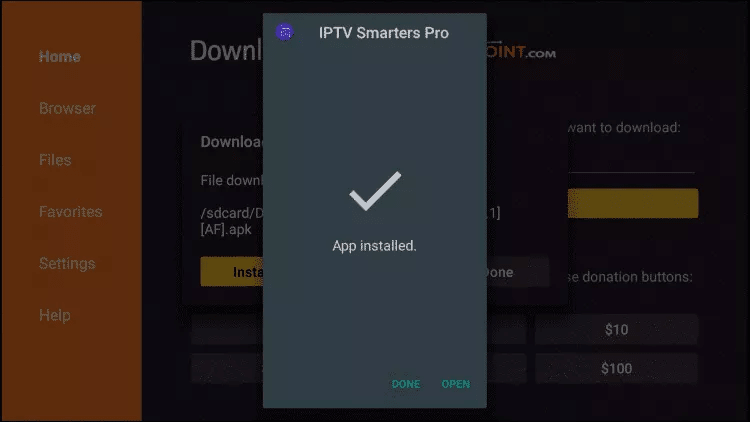
19. Click Done.

Install IPTV Smarters Pro on Fire TV Stick – step 19

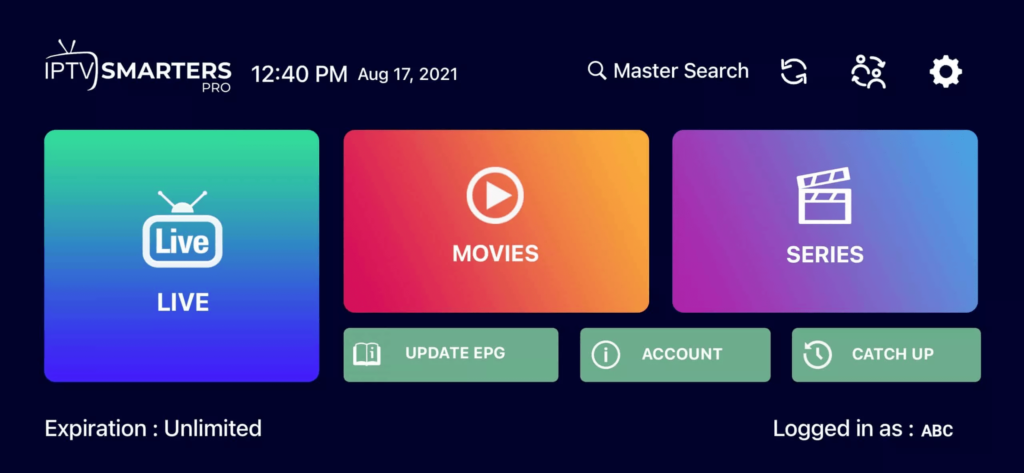
20. Open IPTV smarters, then select Connect to Xtream Codes API.

21. Enter the login details that we send you via Whatsapp or Email or Chat

Alternative: install TiviMate on Fire TV Stick

1. Type the following URL exactly as shown here: https://tivimates.com/tiviapk

and click Go.

Install IPTV Smarters Pro on Fire TV Stick – step 20

2. Wait for the file to download.

Install IPTV Smarters Pro on Fire TV Stick – step 21

Wait for the file to finish downloading.

3. Click Install and once the installation is complete. You can open the app.

4. Click on “Add a playlist” and then choose “Xtream Codes «

5. Enter the login details that we send you via Whatsapp, email or chat.

How to set up IPTV on iPhone and iPad with IPTV Smarters Player

Step 1: Start by downloading the IPTV Smarters app from Apple Store via this URL:
https://apps.apple.com/in/app/smarters-player-lite/id1628995509

or you can search for it on the App Store

Install the app on your IOS device.

Step 2: Open the app once downloaded and enter the login details.

IPTV Smarters Player on iPhone – step 1

Step 3: Enter the login information we provide you after signing up for a subscription with us.

Now click “ADD USER” to move to the next section.

Step 4: Wait a few seconds.

Step 5: Now click on the “Live TV” icon as shown in the picture with a red arrow.
IPTV Smarters Player on iPhone – step 2

Step 6: Now you need to select the channel group you want to watch and move on to the next section.

Step 7: Now you need to click on the channel name and then double click on the small screen to go to full screen as the final step.

Step 8: To add an EPG, you don’t need to add an EPG URL, just click “Install EPG”.

Do


How to set up IPTV on Android with IPTV Smarters Pro

Step 1: Start by downloading the IPTV Smarters app via this URL: https://www.iptvsmarters.com/smarters.apk
Step 2: Open the app once downloaded and enter the login details.

IPTV Smarters Pro on Android – step 1

Step 3: Enter the login information we provide you after signing up for a subscription with us.

Now click “ADD USER” to move to the next section.

Step 4: Wait for a few seconds.

Step 5: Now click on the “Live TV” icon as shown in the picture with a red arrow.

IPTV Smarters Pro on Android – step 2

Step 6: Now you need to select the channel group you want to watch and move on to the next section.

Step 7: Now you need to click on the channel name and then double click on the small screen to go to full screen as the final step.

Do

Step 1: Send the MAC Direction of your MAG via Whatsapp/Email/Live Chat

Step 2 : After making the payment, we will send you the portal link

Windows: install IPTV Smarters

Download the IPTV Smarters app via this URL: https://www.iptvsmarters.com/download?download=windows

Mac: install IPTV Smarters

Download the IPTV Smarters app via this URL: https://www.iptvsmarters.com/download?download=mac

Pay your IPTV subscription with PayPal
Please Fill Out The Form Below. Once The Form is Submitted, You Will Receive An Email With Additional Details To Complete Your PayPal Payment
Thank you for your order!
Ihre Bestellnummer lautet: #1000250

#1000250 Schreiben Sie uns Ihre Bestellnummer per WhatsApp und wir geben Ihnen dort Ihre Zugangsdaten. Unsere WhatsApp-Nummer lautet: +44 7822 000512 Vergessen Sie nicht, Ihre E-Mails zu überprüfen, wir schreiben Ihnen dort

Pay your IPTV subscription with PayPal
Please Fill Out The Form Below. Once The Form is Submitted, You Will Receive An Email With Additional Details To Complete Your PayPal Payment
Thank you for your order!
Ihre Bestellnummer lautet: #1000120

#1000120 Schreiben Sie uns Ihre Bestellnummer per WhatsApp und wir geben Ihnen dort Ihre Zugangsdaten. Unsere WhatsApp-Nummer lautet: +44 7822 000512 Vergessen Sie nicht, Ihre E-Mails zu überprüfen, wir schreiben Ihnen dort

Thank you for your order!
Ihre Bestellnummer lautet: #100089

#100089 Schreiben Sie uns Ihre Bestellnummer per WhatsApp und wir geben Ihnen dort Ihre Zugangsdaten. Unsere WhatsApp-Nummer lautet: +44 7822 000512 Vergessen Sie nicht, Ihre E-Mails zu überprüfen, wir schreiben Ihnen dort

Pay your IPTV subscription with PayPal
Please Fill Out The Form Below. Once The Form is Submitted, You Will Receive An Email With Additional Details To Complete Your PayPal Payment
Pay your IPTV subscription with PayPal
Please Fill Out The Form Below. Once The Form is Submitted, You Will Receive An Email With Additional Details To Complete Your PayPal Payment
Thank you for your order!
Ihre Bestellnummer lautet: #100049

#100049 Schreiben Sie uns Ihre Bestellnummer per WhatsApp und wir geben Ihnen dort Ihre Zugangsdaten. Unsere WhatsApp-Nummer lautet: +44 7822 000512 Vergessen Sie nicht, Ihre E-Mails zu überprüfen, wir schreiben Ihnen dort

Thank you for your order!
Ihre Bestellnummer lautet: #100039

#100039 Schreiben Sie uns Ihre Bestellnummer per WhatsApp und wir geben Ihnen dort Ihre Zugangsdaten. Unsere WhatsApp-Nummer lautet: +44 7822 000512 Vergessen Sie nicht, Ihre E-Mails zu überprüfen, wir schreiben Ihnen dort

Pay your IPTV subscription with PayPal
Please Fill Out The Form Below. Once The Form is Submitted, You Will Receive An Email With Additional Details To Complete Your PayPal Payment
Thank you for your order!
Ihre Bestellnummer lautet: #100029

#100029 Schreiben Sie uns Ihre Bestellnummer per WhatsApp und wir geben Ihnen dort Ihre Zugangsdaten. Unsere WhatsApp-Nummer lautet: +44 7822 000512 Vergessen Sie nicht, Ihre E-Mails zu überprüfen, wir schreiben Ihnen dort

Pay your IPTV subscription with PayPal
Please Fill Out The Form Below. Once The Form is Submitted, You Will Receive An Email With Additional Details To Complete Your PayPal Payment
Thank you for your order!
Ihre Bestellnummer lautet: #100013

#100013 Schreiben Sie uns Ihre Bestellnummer per WhatsApp und wir geben Ihnen dort Ihre Zugangsdaten. Unsere WhatsApp-Nummer lautet: +44 7822 000512 Vergessen Sie nicht, Ihre E-Mails zu überprüfen, wir schreiben Ihnen dort

Pay your IPTV subscription with PayPal
Please Fill Out The Form Below. Once The Form is Submitted, You Will Receive An Email With Additional Details To Complete Your PayPal Payment